Detail of Mediaplayers
This page described the detail of components related to Mediaplayer (Script).
Note: This page is still Under Construction.
Detail Setting of Mediaplayer
| Ignore List | Path of text file of the media list wanted to be ignored in current launch. The list should includes the file name of the ignored media with the format. |
| Auto Play | Enable to auto play media. |
| Auto Next | Enable to auto open next media. |
| Random | Enable to randomly play media. |
| Loop | Loop setting of media player, All to loop all media, One to loop one medium. |
| [Player UI] | The settings to store the UI components of the Player. |
| [Status] | The settings to store and display the status of the player, can be get/set by provided functions. |
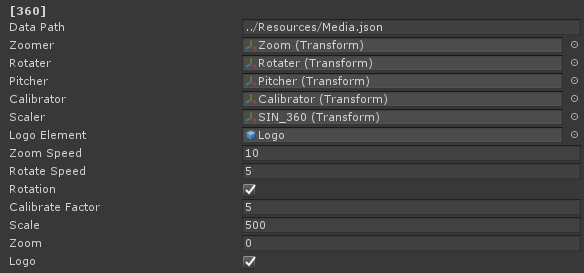
Detail Setting of Mediaplayer360
| Data Path | Path of the json file which store the media data in the path. Recommented to use external resources folder with path "../Resources/*". |
| Zoomer | Transform for zoom. |
| Rotater | Transform for rotate. |
| Pitcher | Transform for pitch angle. |
| Calibrator | Calibrate factor for calibrator. |
| Logo Element | Logo Element for hiding top and bottom of 360 medium. |
| Zoom Speed | Zoom speed of zoomer. |
| Rotate Speed | Rotate speed of rotater. |