Workspace
The Workspace is the default user interface in the XRCC PC where you work to create the XR content. The Workspace is organized using different tabs, each provide a set of tools for users to access different features of the XRCC.
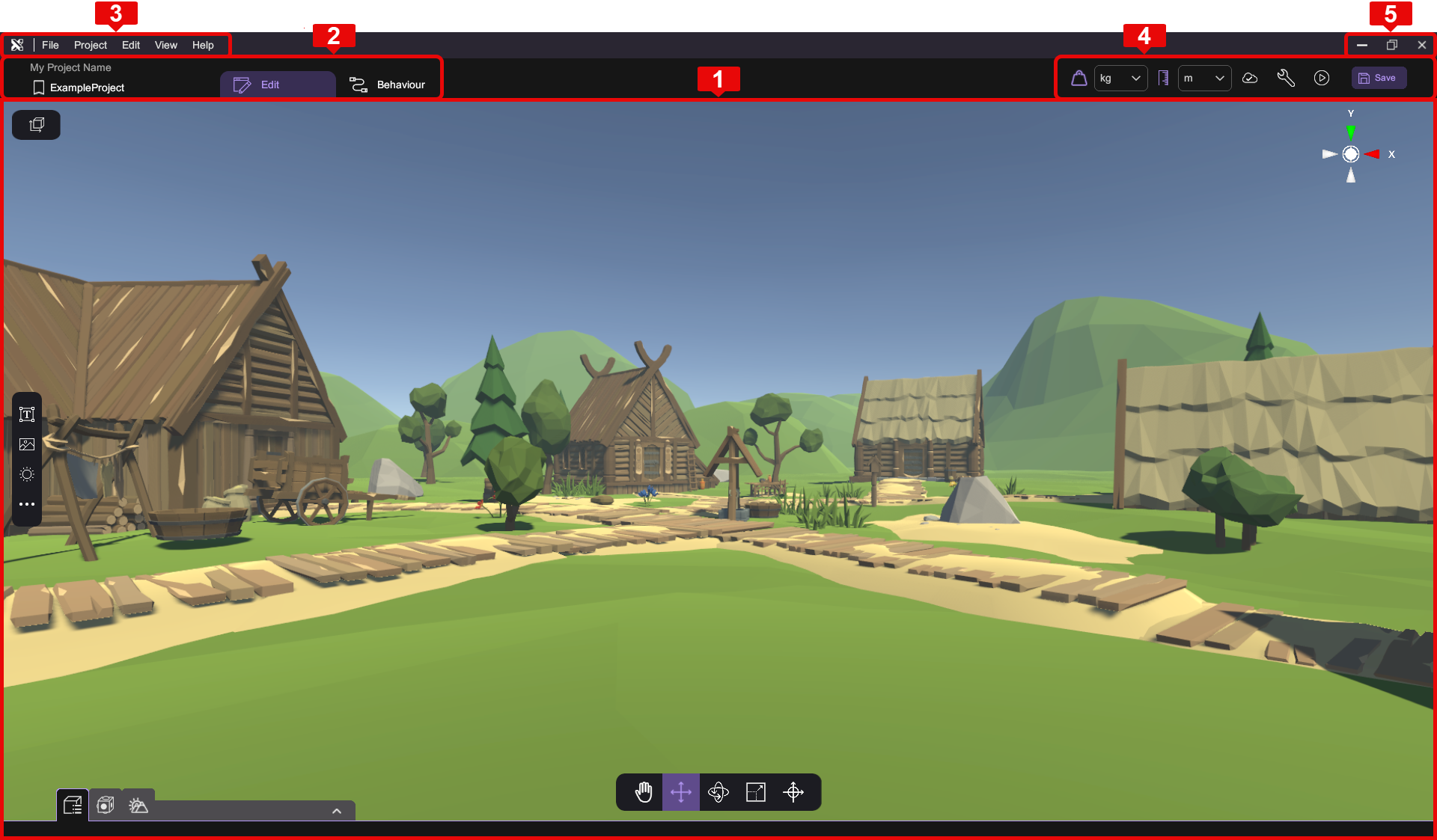
| Section | Description |
|---|---|
| 1 | Main Workspace |
| 2 | Project Header |
| 3 | Main Menu |
| 4 | Status bar |
| 5 | Window Control |
Windown Control Buttons
Full Screen Mode
Full screen mode can be toggled by pressing "Full Screen" () in the upper-right corner. The full screen option can also be found in the setting window.
Quit Application
To quit the XRCC PC, press "Quit" () at the upper-right corner. If there is an unsaved change in the scene, a reminder for saving will appear.
📄️ Home Page
Home Page is the first page when you open XRCC.
📄️ Main Menu
Main Menu located at the top of the frame which mainly separated into five categories: File, Project, Edit, View and Help.
📄️ Project Header
The Project Header allows user to have quick access to various project related information and features. It hosts the two main workspace tabs - Edit and Behaviour, as well as several buttons to access project states / configurations and to run the project in play mode .
📄️ Scene View
The Scene View is accessible under the Edit tab, it visualizes the Scene in 3D space. While in Edit Mode, the Scene View allows you to navigate and edit the scene, and interact with different objects in the scene. While in Play Mode, the Scene View simulates the final visual representation of the created XR scene in first-person perspective, where you can test out the interactions designed for the scene.
📄️ Behaviour Panel
The Behaviour Panel is the main place for creating behaviours. It can be accessed by clicking the Behaviour tab on the Project Header. You can refer to the Behaviour Workspace to know more about how the workspace functions in details.