3D Model

note

3D Model Blocks are available for 3D Model object type only.

Block NameBlockDescription
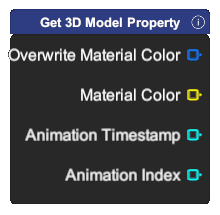
Get 3D Model Property

Output different 3D Model property.

  • Overwrite Material Color: Boolean value specifying whether material color is overwritten.
  • Material Color: Color value specifying the overwrite material color.
  • Animation Timestamp: Number value specifying the current playing animation timestamp.
  • Animation Index: Number value specifying the current playing animation index.
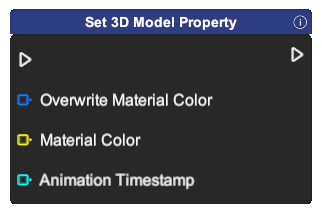
Set 3D Model Property

Set different 3D Model property.

  • Overwrite Material Color: Boolean value specifying whether material color is overwritten.
  • Material Color: Color value specifying the overwrite material color.
  • Animation Timestamp: Number value specifying the current playing animation timestamp.
Play Animation

Play the animation of the model if the model contains animation. Do nothing otherwise.

  • Animation Index: Integer value specifying the animation index to play.
  • Play Mode: Animation option specifying how the animation plays (Loop, PlayOnce, PlayAndReset).
Is Playing Animation
Output is the model currently playing an animation.
Stop Animation
Stop the animation if an animation is playing.
Set Material

Set the material of the object.

  • Material: Image of the material imported by the user.
Set Material Color

Set the material color of the object.

  • Color: Color value specifying the material color.
Reset Material Color

Reset the material color of the object.

Set Model

Set the model to replace the current model.

  • Model: 3D Model asset in the project's asset library.
  • Material: Image asset in the project's asset library.
  • Material Color: Color value specifying the material color.