Slideshow

note

Slideshow Blocks are available for Slideshow object type only.

Block NameBlockDescription
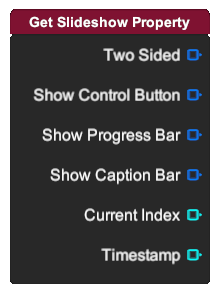
Get Slideshow Property

Output different slideshow property.

  • Two Sided: Boolean value specifying whether the slideshow is two sided.
  • Show Control Button: Boolean value specifying whether the control button is visible.
  • Show Progress Bar: Boolean value specifying whether the progress bar is visible.
  • Show Caption Bar: Boolean value specifying whether the caption bar is visible.
  • note

    Two sided, show control button, show progress bar and show caption bar only exist for 2D slideshow type.

  • Current Index: Integer value specifying the current index of the slideshow.
  • Timestamp: Number value specifying the timestamp of the slideshow.
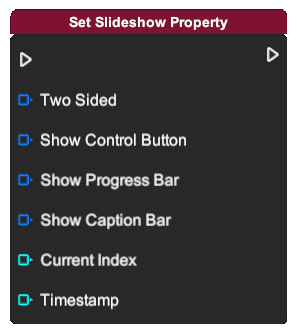
Set Slideshow Property

Set different slideshow property.

  • Two Sided: Boolean value specifying whether the slideshow is two sided.
  • Show Control Button: Boolean value specifying whether the control button is visible.
  • Show Progress Bar: Boolean value specifying whether the progress bar is visible.
  • Show Caption Bar: Boolean value specifying whether the caption bar is visible.
  • note

    Two sided, show control button, show progress bar and show caption bar only exist for 2D slideshow type.

  • Current Index: Integer value specifying the current index of the slideshow.
  • Timestamp: Number value specifying the timestamp of the slideshow.
Play Slideshow
Start playing the slideshow.
Pause Slideshow
Pause the slideshow.
First Slide
Reset the slideshow to display the first slide.
Previous Slide
Display the previous slide.
Next Slide
Display the next slide.
Total Count

Output the total page count of the slideshow.

Is Playing

Output whether the slideshow is playing or not.