Poe

Block Name
BlockDescription
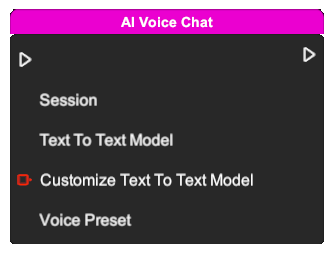
AI Voice Chat

Start a voice conversation with the AI.

  • Session: Select a session that has a core instruction and stores the chat history.
  • Text To Text Model: Select a text-to-text model from the list, or choose a custom model by entering the model name in the input field below. This model is used to generate a text response from the user's input.
  • Customize Text To Text Model: Text value to use as the model name when the Text To Text Model dropdown is set to "Customize".
  • Voice Preset: Select a voice preset that contains voice settings such as voice, language, and speed.
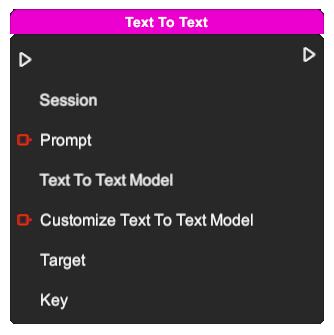
Text To Text

Generate a text response from the user's input.

  • Session: Select a session that has a core instruction and stores the chat history.
  • Prompt: Text value used as the prompt for the AI to generate a text response.
  • Text To Text Model: Select a text-to-text model from the list, or choose a custom model by entering the model name in the input field below. This model is used to generate a text response from the user's input.
  • Customize Text To Text Model: Text value to use as the model name when the Text To Text Model dropdown is set to "Customize".
  • Target: Object or scene that contains the string variable.
  • Key: Text key of the variable to read or write.
Speech To Text

Convert the user's voice input to text.

  • Target: Object or scene that contains the string variable.
  • Key: Text key of the variable to read or write.
Text To Speech

Convert text into voice output.

  • Prompt: Text value used as the prompt for the AI to generate a text response.
  • Voice Preset: Select a voice preset that contains voice settings such as voice, language, and speed.
Stop Recording

Stop the voice recording manually.

Text To Image

Generate an image from the user's input and replace the object's image asset.

  • Model: Select a model from the list.
  • Prompt: Text value used as the prompt for the AI to generate an image.
  • Aspect Ratio: Select an aspect ratio from the list.
note

This node is available only for the Image object type.

Text To Sound

Generate sound from the user's input.

  • Model: Select a model from the list.
  • Prompt: Text value used as the prompt for the AI to generate sound.
Text To Music

Generate music from the user's input.

  • Model: Select a model from the list.
  • Prompt: Text value used as the prompt for the AI to generate music.
Chat With AI Character

Start a conversation with the AI character.